Alarms and Indicators
The Feed Controller displays lights to indicate conditions that affect operation.
Red lights indicate alarms.
Green lights indicate an operational condition.
EMPTY Alarm

The EMPTY alarm activates when the hopper contains no feed.
To clear the alarm:
Power off the controller.
Fill the hopper with feed.
Power on the controller. The EMPTY alarm is no longer active.
NO AIR Alarm
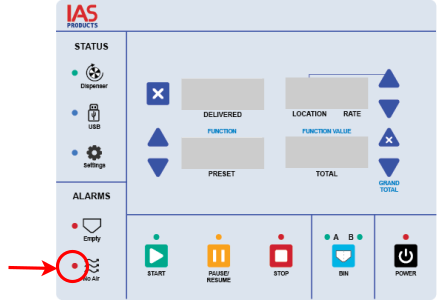
The NO AIR alarm activates when the engine is not running.
Start the engine. Once the engine is running, power the feed controller off and back on to clear the alarm.
BIN B Indicator

A flashing BIN B green light indicates the rotary sensor did not detect a signal within 8 seconds. Feed dispensing continues.
Possible causes:
The rotary is not turning due to a jam or motor malfunction. Refer to Rotary Diagnosis.
The rotary sensor plate is loose. Refer to Rotary Sensor Plate.
The rotary sensor cable is loose. Refer to Rotary Sensor Cable.
The rotary sensor has malfunctioned. Refer to Rotary Sensor Diagnosis.