Air Sensor Type F13
The correct air sensor setting depends on the type of air sensor installed on the AeroCUBE.
The F13 setting configures the air sensor type on the Feed Controller.
F13 value 1 is for the Pitot sensor.
F13 value 2 is for the Switch sensor.
Identify the Sensor Type
Check the serial number on the AeroCUBE to confirm the correct F13 setting.
AeroCUBE Serial# | Air Sensor Type | F13 Value |
SC00001 – SC00008 | Switch | 2 |
SC00009 and above | Pitot | 1 |
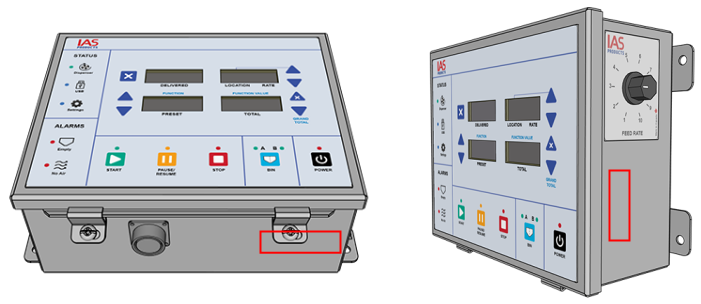
The serial number is located on either the underside or right side.
Set the Sensor Type
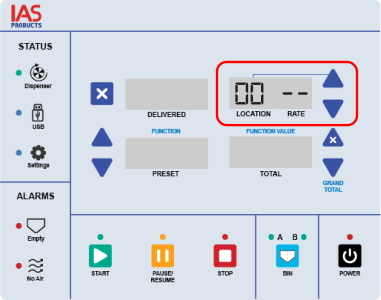
Press the ▲ or ▼ button next to the Location window to set the value to 00 (zero).
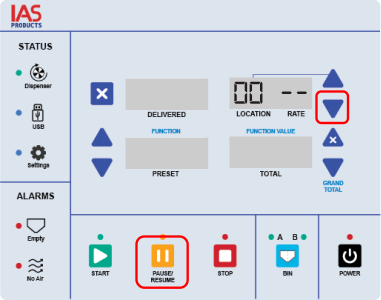
Press both the ▼ and PAUSE buttons at the same time to enter Settings mode.
The blue Settings light turns on to confirm Settings mode is active.
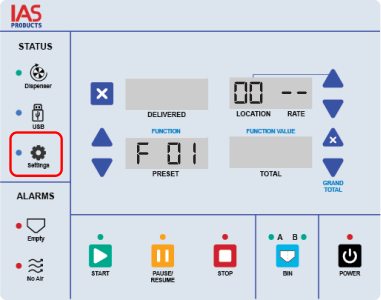
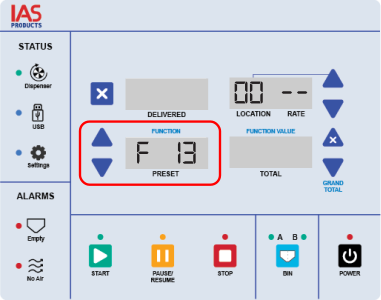
Press the ▲ or ▼ button next to the Function Number window until F13 is displayed.
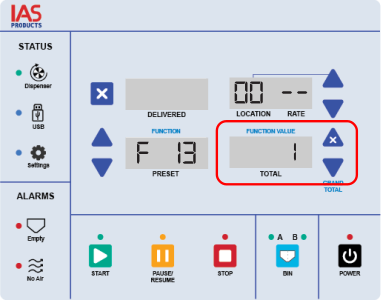
Press the ▲ or ▼ button next to the Function Value window until the correct F13 value is displayed. See Identify the Sensor Type above for the correct setting.
Press both the ▼ and PAUSE buttons at the same time to exit Settings mode.
The air sensor type is now set.