Sensor Bypass F14
The Feed Controller has three sensors: the feed sensor, air sensor, and rotary valve sensor.
The feed sensor and air sensor trigger an alarm when a problem is detected.
When an alarm is triggered, the rotary valve stops.
F14 allows the feed sensor and air sensor to be bypassed.
Controller Compatibility
Not all Feed Controllers have the F14 setting.
Check the serial number on your controller before proceeding.
Serial Number | F14 Available |
SCC00001 – SCC00006 | No |
SCC00007 and above | Yes |
Controllers without the F14 setting will be updated at a later date.
The serial number is located on either the underside or right side.
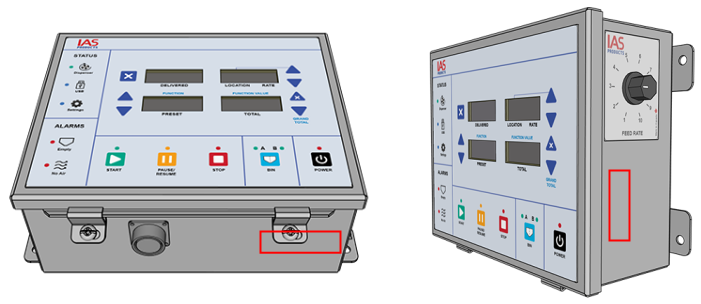
Effect of Bypassing a Sensor
Sensor | Sensor Not Bypassed | Sensor Bypassed |
|---|---|---|
Feed sensor | Empty alarm activates. Rotary valve stops when hopper is empty. | Empty alarm does not activate. Rotary valve continues to run when hopper is empty. |
Air sensor | No Air alarm activates when engine is not running. START button is inactive. | No Air alarm does not activate. START button is active. |
F14 Values
The F14 setting has four values. Each value determines which sensors are bypassed.
F14 Value | Sensor Bypassed |
|---|---|
1 | None — no sensors are bypassed. All alarms are active. |
2 | Air sensor is bypassed. |
3 | Feed sensor is bypassed. |
4 | Air sensor and feed sensor are bypassed. |
Set the Sensor Bypass
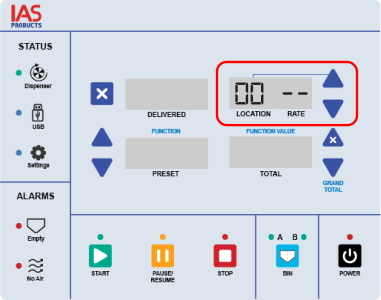
Press the ▲ or ▼ button next to the Location window to set the value to 00 (zero).
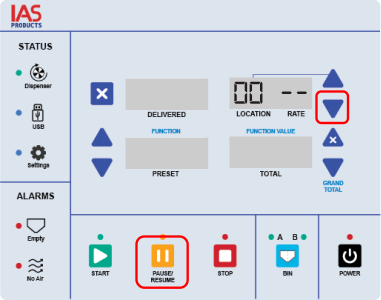
Press both the ▼ and PAUSE buttons at the same time to enter Settings mode.
The blue Settings light turns on to confirm Settings mode is active.
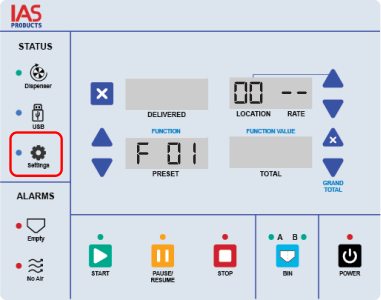
Press the ▲ or ▼ button next to the Function Number window until F14 is displayed.
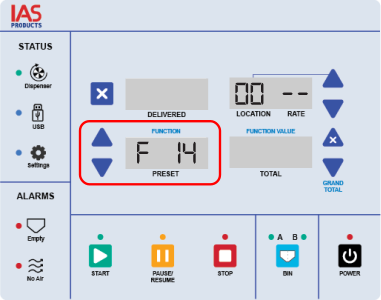
Press the ▲ or ▼ button next to the Function Value window until the desired F14 value is displayed. See F14 Values above for the complete list.
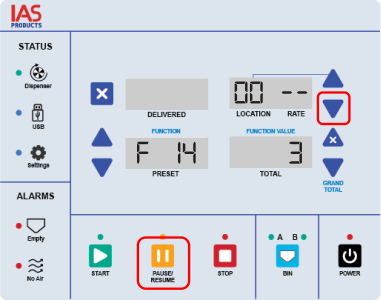
Press both the ▼ and PAUSE buttons at the same time to exit Settings mode.
The selected sensor is now bypassed.