Feed Sensor - Troubleshooting
When troubleshooting is needed
When the red Empty Alarm light is on but there is feed in the hopper, the feed sensor may not be detecting feed correctly.

The feed sensor is located underneath the hopper, above the rotary valve. There is an orange sensor light on the body of the sensor.

Normal Operation
Under normal conditions, the sensor light should behave as follows:
Hopper | Sensor Light |
|---|---|
Empty | Off |
Has feed | On |
If the hopper has feed and the sensor light is off
If the hopper has feed and the sensor light is off, this may be caused by:
A loose cable connection.
The sensor not being firmly attached to the sensor bracket.
The sensor not working.
1. Check for loose cable connection
To check the cable is firmly connected to the sensor, turn the collar clockwise to ensure the cable is securely connected.

2. Check the sensor is firmly attached to the bracket
Hold the sensor and try to move it. If it moves, tighten both nuts firmly against each side of the bracket.

3. Check whether the sensor is working
To verify if the sensor is working, the sensor must be removed from the bracket and a metal object placed in front of the sensor face.
To remove the sensor, hold the sensor to prevent it from turning. Loosen the outer nut, then unscrew the inner nut toward the sensor face to create enough clearance to remove the sensor from the bracket.

Slide the sensor out of the notch on the bracket.
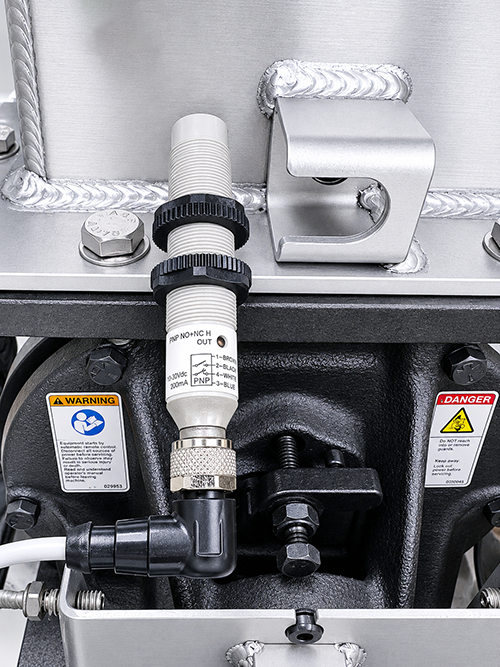
Place the face of the sensor against a metal surface.

Check the LED light on the sensor:
If the LED light turns on — the sensor is working. Slide the sensor back into the notch on the bracket. See Feed sensor — position calibration.
If the LED light does not turn on — the sensor is not working. See Feed sensor — Replacement.